
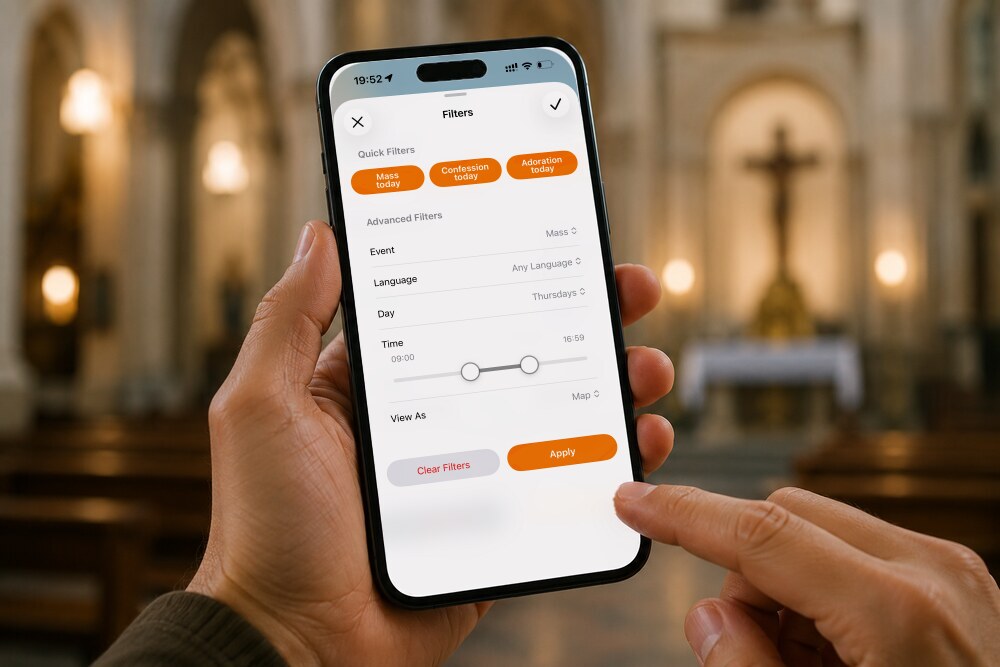
Do you work unusual hours and need to find a late-evening Mass? Are you looking for Confession in your own language before a trip, or an Adoration chapel that’s open right now?
The filters in the Catholic Mass Times app were built for exactly these searches, and they answer them in seconds instead of making you check one church at a time.
This guide covers what the filters are, how to use them step by step, and which combinations will get you to precisely the Mass, Confession, or Adoration you need, today or any other day, at Catholic churches near you.
If you don’t have it yet, you can download the Catholic Mass Times app free for iOS and Android. With more than 138,000 churches in every country on earth, it’s the largest and most up-to-date database in the world for finding Mass times near your location. Download it now.
1. What are the filters in the Catholic Mass Times app?
The filters are an advanced search tool inside the app that lets you find Masses, Confessions, and Adoration by day, time, and language. Rather than working your way through the schedules of every parish around you, the filters do that work and show you only what matches what you’re looking for.
The tool comes into its own when your usual routine changes, when you’re traveling in a city you don’t know, or when you need a Catholic Mass near you at a particular hour, whether that’s before 9:00 AM or somewhere between noon and 1:00 PM.
2. Where is the filters icon in the app?
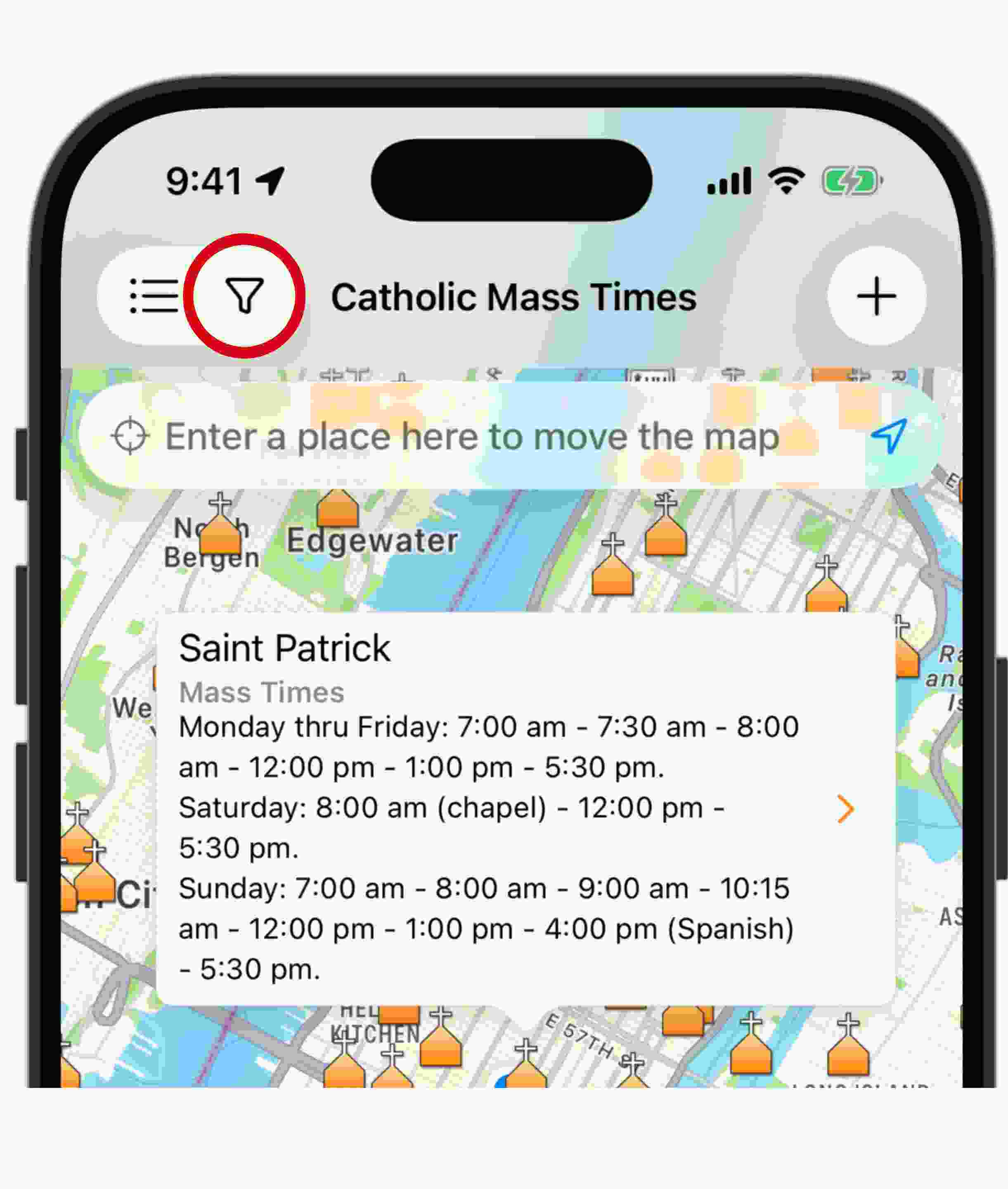
The filters icon is shaped like a funnel and sits in the upper left of the main screen, just to the right of the list icon. Tap it and the
Filters screen opens, divided into two sections: Quick Filters and Advanced Filters.
If you don’t see the funnel icon in your app, you most likely don’t have the latest version installed. Visit catholicmasstimes.com/download or update the app from the App Store or Google Play to get access to this feature.
3. How do the quick filters work?
Quick Filters are three instant-access buttons, built for the searches people make most often at Catholic churches near them:
- Mass today shows every church where you can still take part in Holy Mass today.
- Confession today shows the Confession times still available today.
- Adoration today finds the churches offering Eucharistic Adoration right now.
One tap on any of these three filters the map or the results list down to what’s available at this moment, with nothing else to configure.

4. How do the advanced filters work?
Advanced Filters let you combine several criteria at once to find exactly what you need. There are five settings.
- Event: choose whether you’re looking for Mass, Confession, or Adoration.
- Language: narrow the results to English, Spanish, Portuguese, French, Dutch, Italian, German, or Latin. This is the setting to reach for if you’d rather assist at Mass in Spanish, wherever you happen to be, or if you’re looking for the Traditional Latin Mass.
- Day: pick any day, weekdays, Sundays, Holy Days of Obligation, or civil holidays, whether you’re looking for Sunday Mass near you or planning ahead.
- Time: set a specific window, such as before 9:00 AM or between noon and 1:00 PM.
- View As: choose whether to see your results on a map or as a list, whichever suits you better.
All of these work together. You could search for a Mass in Spanish, next Sunday, between 10:00 AM and 12:00 PM, and see the results on the map. Once your search is set, tap Apply to see the results. To start over, tap Clear Filters and you’re back to the general search.

5. What combinations can I search for?
The filters handle some genuinely specific searches. A few that come up often:
- A Mass, Confession, or Adoration you can still get to today.
- The Traditional Latin Mass near you.
- Mass or Confession in your native language, even while traveling through another country.
- Eucharistic Adoration chapels open at this moment.
- A Mass next Saturday morning, before 9:00 AM.
- A Mass or Confession tomorrow, between noon and 1:00 PM.
Combinations like these are what make the app one of the most complete tools available for finding Mass times without working through parish after parish.

6. Why are the filters so useful?
The filters make a real difference when it comes to living the sacraments regularly. Whether you’re traveling, whether you missed Mass at your usual parish, or whether you simply want to plan your week in advance, this feature helps you find Mass times for today, for tomorrow, or for Sunday, shaped around your own schedule and your own language.
This functionality came out of several years of work by the Catholic Mass Times team, and it was made possible by the effort of everyone on it, by the financial generosity of our community, by those who send in information about their parishes, and by the prayers of everyone who sustains this project.

Want to learn more about the Catholic Mass Times app? These articles may help:
- How Does the Catholic Mass Times App Work? Full Guide : Everything about the Catholic Mass Times app, from finding Mass times today to filters, favorites, and much more, whether you’re at home or traveling.
- How Do I Request an Uber or Lyft to Get to Mass From the App?: Request an Uber, Lyft, or Cabify to get to Mass in one tap, with the church’s address already loaded as your destination. No copying, no explaining.
- How Do I Share a Church’s Mass Times With a Friend?: Share a church’s Mass times from the app via WhatsApp or social media. Help your friends get to Mass and receive the sacraments more often.
- Can I Save My Favorite Catholic Churches in the Catholic Mass Times App?: Learn how to use the favorites in Catholic Mass Times app: save your favorite parishes, plan pilgrimages, and keep track of the churches you’ve visited.

How do I search for a Mass by time in Catholic Mass Times?
Tap the funnel-shaped filters icon, choose Mass as the Event, and set the Time range to the hours you need. You can combine it with a specific day or a language as well.
Can I search for Mass in a specific language?
Yes. In Advanced Filters you can choose from English, Spanish, Portuguese, French, Dutch, Italian, German, and Latin, for both Mass and Confession.
How do I find Confession today at Catholic churches near me?
Tap the filters icon and select the Confession today quick button. The app will show every church where you can still go to Confession today.
Do the filters work for Eucharistic Adoration as well?
Yes. Use the Adoration today quick button to see the chapels open right now, or Advanced Filters to look for Adoration on a specific day and at a specific time.
Can I search for Holy Days of Obligation or civil holidays?
Yes. The Day filter lets you choose between any day, weekdays, Sundays, Holy Days of Obligation, and civil holidays.
What if I don't see the filters icon in the app?
If the funnel icon isn’t there, you don’t yet have the most recent version of the app. Download or update it from catholicmasstimes.com/download, the App Store, or Google Play.
How do I clear the filters and see all churches again?
On the Filters screen, tap Clear Filters to remove every search criterion and go back to seeing all the churches near you.


